
What Is AgOpenGPS? A Clear Beginner's Guide
If you have been researching affordable autosteer, you have probably run into the question: what is AgOpenGPS, and does it actually replace a €15,000 proprietary guidance system? The short answer is that AgOpenGPS is an open-source precision-agriculture project for field guidance, autosteer, mapping, section control and implement control. It is not a single gadget you buy, and it is not a phone app that steers a tractor on its own. It is a software and open-hardware ecosystem that coordinates positioning, guidance decisions and machine-control equipment. Understanding that distinction is the whole game, because it tells you what you are really buying, what you still need to install, and where a mobile-first product like ours fits alongside it.
Table of contents
- • AgOpenGPS in plain terms: software, hardware, community
- • The five layers that make autosteer work
- • The hardware an AgOpenGPS autosteer build actually needs
- • What "open source" changes for your farm
- • AgOpenGPS versus Agro Navigator: not the same thing
- • Does AgOpenGPS run on Android or iOS?
- • What accuracy can you realistically expect?
- • How a beginner should decide whether AgOpenGPS suits the farm
- • Operating limits you must respect
- • Frequently asked questions
AgOpenGPS in plain terms: software, hardware, community
AgOpenGPS is an open-source platform that combines software, community-developed electronics and farm-machine hardware. In its classic form, the software is two closely connected Windows programs. AgOpenGPS is the operator application that displays maps, guidance lines and field information, then calculates steering commands. AgIO is the communication hub that passes GNSS data, RTK corrections, wheel-angle readings and other external signals between the computer and the steering hardware.
The project documentation is specific on one point that trips up newcomers: AgOpenGPS is described as a Windows program, not a native Android or iOS application. That single fact shapes almost every practical decision that follows, from which computer sits in the cab to how you compare a conventional installation against a mobile product.
It also means AgOpenGPS is not simply a GPS map on a screen. At its simplest it delivers field mapping, guidance lines, a light bar, coverage recording and manual steering assistance. With the required steering hardware it extends to automated steering, section control, rate control, implement-management functions and RTK-based precision guidance. The official quick-start material frames these as separate capability tiers: light-bar guidance, full autosteer, autosteer with section control, and autosteer with rate control. Where you land on that ladder determines how much hardware you install.
The five layers that make autosteer work
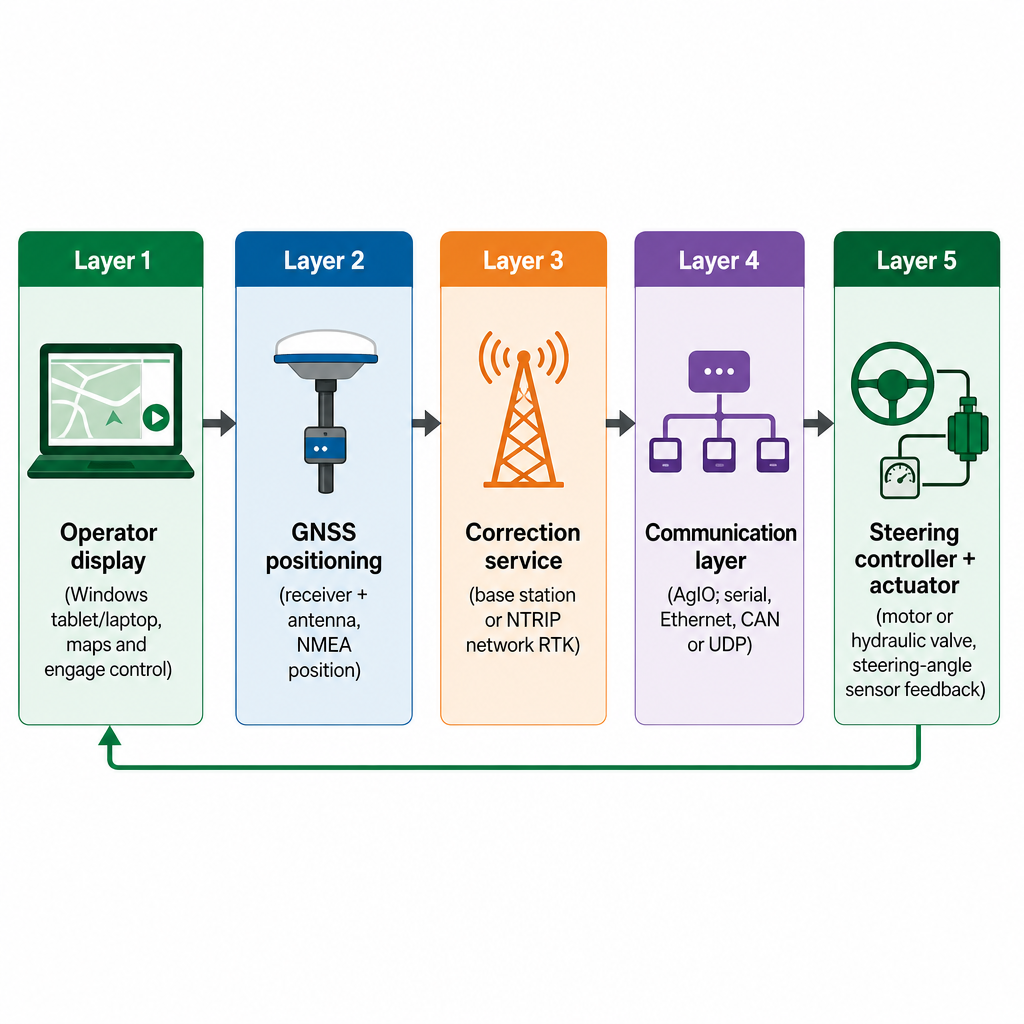
The quickest way to demystify any autosteer system is to stop treating it as one box and split it into functional layers. Each layer has a different job, a different failure mode and a different cost.
The operator display is normally a Windows 10/11 tablet or laptop running the software. It shows the vehicle on a field map, draws the guidance line, reports position and steering data, records coverage, holds setup and calibration controls, and lets the operator enable or disable autosteer. Critically, the display is not the steering system by itself.
The GNSS receiver determines where the machine is. A basic receiver may be fine for general guidance or mapping, while an RTK-capable receiver supports much tighter repeatability when paired with an appropriate correction service. AgOpenGPS treats GNSS data, including NMEA position messages, as an input. A tablet without suitable external GNSS hardware is not a complete RTK autosteer solution, no matter how good the app looks.
The correction service sharpens that position. Common paths include a local farm base station, network RTK delivered through NTRIP, or other receiver-supported correction services. Correction source, cellular coverage, antenna installation, subscription and local conditions all affect the outcome. The communication layer then shuttles information between display, GNSS, sensors and steering controller; AgIO plays this role in the classic architecture, and depending on the hardware design the transport may be serial, Ethernet, CAN or UDP.
Finally, the steering controller and actuator turn commands into movement. The actuator may be an electric steering motor, a hydraulic steering valve, a factory steer-ready system or another supported interface, and a steering-angle sensor feeds back how the wheels are actually moving. The official project documentation lists the core vehicle-side requirements as a Windows computer, a GPS source, a controller board, a steering-angle sensor, and either a steering motor or hydraulic steering system.
The hardware an AgOpenGPS autosteer build actually needs
Once the layers are clear, the shopping list writes itself. A practical AgOpenGPS autosteer installation normally pulls together the components below, though the exact mix depends on your tractor, existing steering interface, implement goals and target accuracy.
| Component | What it does |
|---|---|
| Windows tablet or laptop | Runs the AgOpenGPS and AgIO software |
| GNSS receiver and antenna | Provides and receives satellite position |
| RTK correction source | Improves position quality and repeatability |
| Controller board or ECU | Connects the software to machine hardware |
| Steering-angle sensor | Reports actual steering position |
| Steering motor or hydraulic valve | Moves the steering system |
| Operator controls, power and wiring | Engage/override, plus secure mounting |
The honest caveat is fitment. A steer-ready tractor may expose a supported CAN interface and need a very different control path from a machine that requires a retrofit steering motor, a hydraulic valve and extra sensors. A steering wheel does not guarantee a straightforward retrofit, and that is where many first builds stall. If you want the cost drivers broken down properly, our write-up on RTK autosteer hardware kit cost separates the ECU, receiver, corrections and installation inputs instead of quoting a single misleading figure.
What "open source" changes for your farm
Open source means the project publishes important software, hardware designs and documentation for inspection, modification and community development. The official AgOpenGPS organisation describes its repositories as containing hardware designs, software and wikis for a do-it-yourself guidance system, and the current software repository is released under the Apache License 2.0.
For a farm or dealer, the upside is real: more visibility into how the system works, more freedom to choose compatible components, access to community-developed electronics, and room for customisation and repair. The trade-off is responsibility. Open source does not mean every part works together automatically. Hardware, firmware, protocols, software versions and machine fitment all still have to match, and that matching work lands on you or your installer rather than a single vendor. For technically capable operators and workshops, that is a fair deal. For a farmer who wants to turn a key and drive, it is a cost to factor in honestly.
AgOpenGPS versus Agro Navigator: not the same thing
This is the comparison most beginners actually care about, so it deserves a clean line. AgOpenGPS is an open-source software and hardware ecosystem whose established workflow uses a Windows tablet or laptop, the AgOpenGPS and AgIO software, GNSS equipment and compatible steering hardware.
Agro Navigator is our separate, supervised precision-agriculture product. We provide a native mobile cockpit for Android, iPad and iPhone, together with a dedicated ECU and supported machine-control hardware. Our mobile app handles guidance, setup, calibration, diagnostics, RTK-status information, live machine status and coverage recording. Our architecture keeps the same functional separation described above: the phone or tablet is the operator interface, the GNSS receiver handles positioning, RTK/NTRIP or another supported source supplies corrections, the dedicated ECU manages communication and the machine-control interface, a CAN, hydraulic or retrofit path performs steering, and optional 4G/LTE or LoRa hardware carries telemetry.
The point we never blur: a phone or tablet cannot autosteer a tractor by itself. The mobile device, ECU, suitable GNSS hardware, correction data and supported steering hardware must work together for centimetre-class autosteer. So while our workflow can be AgOpenGPS-compatible or open-protocol in supported configurations, Agro Navigator is not the AgOpenGPS Windows application, and it should not be described as an official AgOpenGPS iOS or Android port.
Does AgOpenGPS run on Android or iOS?
Not in its established form. The software documentation describes AgOpenGPS as a Windows application, and the quick-start guide specifies a Windows tablet or laptop as the computer that runs it. If someone tells you there is an official AgOpenGPS app that natively steers from an iPad, treat that as a misunderstanding.
What does exist is a separate mobile-first product that interoperates with selected AgOpenGPS-compatible boards or open protocols. We currently list native support for Android, iPad and iPhone, with the mobile device acting as the cockpit while the ECU and external hardware handle the machine-side communication and steering path. Compatibility stays configuration-specific and should be verified before purchase. If the mobile angle is your main interest, we go deeper in AgOpenGPS without a Windows PC and in AgOpenGPS for iPad.
What accuracy can you realistically expect?
Accuracy is the question where marketing tends to overpromise, so set expectations against physics rather than slogans. AgOpenGPS can be used across different GNSS accuracy levels, and the real-world result depends on receiver quality, antenna placement, satellite visibility, correction source, cellular or radio coverage, machine calibration, steering hardware, wheel-angle sensing, terrain and the quality of the installation.
An RTK receiver paired with a suitable correction source can support centimetre-class guidance, but no software alone can guarantee centimetre accuracy. Our configurator describes the optional RTK module as capable of roughly ±2.5 cm with RTK, while explicitly noting that actual performance depends on the antenna, sky view, correction source, calibration and machine setup. Read any quoted figure as a technical capability under stated conditions, not a promised field result on every pass.
How a beginner should decide whether AgOpenGPS suits the farm
Before committing, work through a few decisions in order. Each one changes the hardware, the budget and the installation effort.
First, decide whether you need guidance or automated steering. A light bar and guidance lines keep the system simple. Autosteer adds a controller, actuator, feedback sensor, safety controls and machine-specific calibration. Second, confirm whether the tractor is steer-ready. A supported CAN-based steering interface is a very different project from a hydraulic valve installation or a retrofit motor. Third, audit any GNSS equipment you already own; it can reduce the shopping list only if its output, communication method, antenna, correction format and firmware are compatible.
Fourth, judge whether you genuinely need RTK. It earns its cost when repeatable lines matter for strip tillage, planting, bed preparation, inter-row cultivation, controlled traffic, repeatable spraying and precision implement work. For broad-acre guidance or basic mapping, a lower-cost GNSS configuration may be enough. Fifth, and most underrated, assess whether you can support installation and maintenance: wiring, firmware, calibration, network settings, GNSS configuration, sensor alignment, steering tuning, hardware replacement and operator training. An open system reduces licensing dependence but hands you more of the setup responsibility.
If that last point is where you hesitate, a mobile-first supervised product may suit you better than a from-scratch build. We are most relevant when you want a cockpit on a phone or tablet instead of a Windows computer in the cab. Our current configurator covers several machine paths, including diagnostics-only operation, steer-ready machine CAN, retrofit CAN steering, hydraulic valve and section I/O, and retrofit steering-motor hardware, and it separates the base ECU, GNSS receiver, correction source, steering interface, enclosure, connectivity and support.
Treat the configurator as indicative rather than a final checkout. Displayed estimates may exclude or separately account for VAT, shipping, installation, subscriptions, SIM or data plans, and third-party correction services. Confirm final compatibility, scope, availability and lead time in a written quote. For installation or compatibility questions, talk to our dealer network; to price a specific setup, use the hardware configurator instead of any old two-model comparison.
Operating limits you must respect
Whatever you build, autosteer is an assistance system, not a chauffeur. A trained operator must stay in control, monitor the machine, and be able to disengage or override steering at any time. Our hardware is supervised field guidance and pilot equipment; it is not a standalone emergency-stop, braking or unsupervised road-use system.
Autosteer also never removes the need to watch for field obstacles, people and animals, headland conditions, implement behaviour, hydraulic and electrical faults, GNSS or correction outages, local regulations and machine-specific safety procedures. Keeping those responsibilities with the operator is what makes precision guidance safe to run day after day.
Frequently asked questions
Is AgOpenGPS free?
The software is open source, but a working system still needs hardware: a computer, GNSS receiver, correction service, controller, sensors and steering equipment. In practice, hardware, installation and subscriptions cost far more than the software itself.
Is AgOpenGPS the same as Agro Navigator?
No. AgOpenGPS is an open-source software and hardware ecosystem. Agro Navigator is our separate mobile-first product with native Android, iPad and iPhone apps, a dedicated ECU and supported steering integrations.
Can I use AgOpenGPS on an iPad?
The established AgOpenGPS software runs on Windows. An iPad can run a separate product designed for iOS, such as ours, but that is not the official Windows application running natively on iPad.
Does AgOpenGPS require RTK?
No. It supports basic guidance and mapping with suitable GNSS equipment. RTK matters when the job needs higher repeatability and centimetre-class guidance.
Can a phone autosteer a tractor on its own?
No. The phone or tablet is only the operator interface. A complete system also needs suitable GNSS, correction data, a controller or ECU, compatible steering hardware, machine interfaces and safety controls.